Many K-12 HR professionals find PowerSchool Employee Records incredibly useful for onboarding new staff to the district. But did you know the same functionality that makes onboarding new employees faster and easier can be even more helpful in the day-to-day management of existing employees?
Employee Records isn’t just an onboarding tool. It’s a records management solution. And the same capabilities it has for managing the complex tasks of onboarding employees can be applied to many situations concerning the management of documentation, contracts, and more.
Many districts find Employee Records helpful during onboarding because of these five key capabilities:
- Employee self–service – Employees have direct access to the documents and content they need from anywhere and at any time. They can start tasks immediately, and at their own convenience, so tasks get completed faster and with less burden on school administrative staff.
- Online review and approval process – As documents are submitted, reviewers can approve them immediately or send them back with comments for needed edits. This is all done online and can be routed to the correct reviewer immediately.
- Personalized documents – Letters and contracts can be personalized. Districts can leverage provided templates, or they can build their own forms and have content dynamically added—such as the recipient’s name, role, address, pay, and more. This means administrative staff can essentially use the same form while still providing personal and accurate documents to many applicants every time.
- E-signatures – Recipients and reviewers can e-sign forms, eliminating the need to route contracts for approval and piles of old contracts that have to be stored and cared for.
- Checklists and progress tracking – A central checklist keeps the employee moving easily through the process, while administrative staff can easily check on progress and provide help if needed. You can also add non-document tasks, like requiring employees to watch a video, review a handbook, or visit a website.
These capabilities can help districts in a number of day-to-day situations. By using online records management, you can eliminate a lot of busy work for administrative staff while speeding up regular processes for current employees.

A Highly Capable Digital Records Solution for Managing Current Employees
By leveraging the same Employee Records functionality that helps with onboarding, K-12 staff can streamline and automate multiple ongoing activities for existing employees.
Consider these examples:
- Changing personal information – Administrative staff is constantly processing minor requests like name and address changes, updating emergency contacts, FMLA, and more. These are often straight-forward updates to existing forms and can be simplified via Employee Records by allowing staff to update their own information. Employees can just log into Employee Records and complete updates online.
- Getting feedback – This last year, many districts wanted to solicit feedback from their staff through surveys. A survey is also basically a form for respondents to fill out. You can use Employee Records to create a “survey” form, then send it out to all your staff for completion. This allows you to use the tool you already have to automatically notify staff, collect unique responses, and aggregate results.
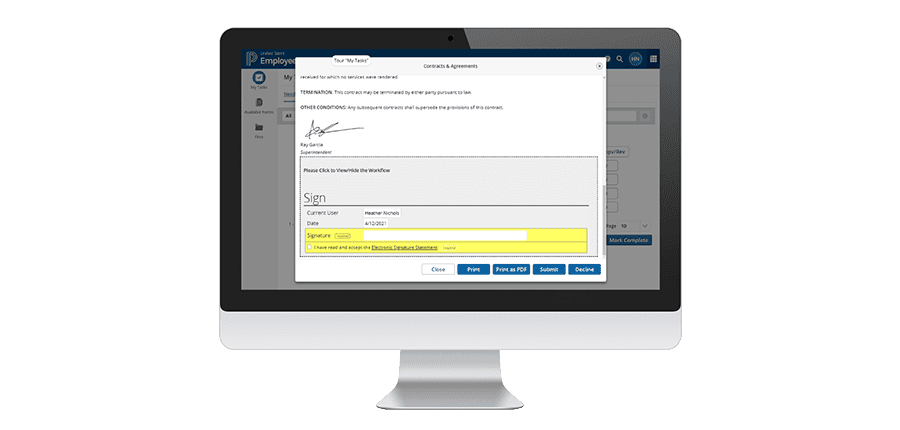
- Updating and creating new contracts – K-12 districts are almost always processing new or updated contracts. Teachers change their roles, add new responsibilities, or need to confirm their intent to return. We find that many districts using Employee Records for new employee contracts as a part of onboarding forget they can use that same capability for existing employees. You can easily use Employee Records to create, distribute, sign, track, and store ongoing employee contracts. Contracts are personalized with the employee’s name, salary, and other personal information. The employee can e-sign from anywhere, while administrative staff can always track the status of the contracts from one place. You can even automate reminders to make sure employees complete all their tasks.
- Using checklists for (un)common tasks – In addition to everyday tasks, there is a host of infrequent tasks that can confound staff and bog down administrative teams. One teacher may need to take leave. Another needs to request equipment. A third wants to set up a field trip for students. Since these tasks are less frequent, employees often don’t know what to do or where to start. With Employee Records, these can all be set up as standard checklists that map out each step, including which forms need to be completed. The whole process, including sign-off, can be done online and simplified for everyone.
- Storing and accessing files online – Most districts have walls of file cabinets holding reams of paper. If staff need to find a document, like their proof of employment, they have to come to the office and dig through stacks of files. With Employee Records, you can store all of these files digitally, so they’re accessible online. Not only do you get rid of all the file cabinets, but you can also get rid of the busy work of finding files as well. If a staff member needs to find a document, they can log directly into Employee Records and view all their own files. Access controls and security measures ensure employees can only open documents they’re authorized to see. This also makes it easier for administrative staff to find the documents they need for compliance.
Baton Rouge, LA
Demonstrating compliance in Employee Records is much easier. We have the files set up very nicely with all of our teaching certifications, transcripts, custom titles, and folders.
Barbara Burke Director of Human Resources and Staff Development
West Baton Rouge Parish Schools
Simplifying Employee Departures, Too
The end of the year is challenging enough. But employee departures can add a slew of small but important tasks at a time when everyone is tired and burnt out. There are countless stories of employees leaving a district but still getting paid, or having access to email, or not returning hardware. It’s understandable that some tasks can fall through the cracks when an employee leaves. But they don’t have to. You can apply the same rigor to offboarding staff as you do to onboarding. And once you set it up, it’s easy to execute every time someone leaves.
You’ve probably already set up an onboarding checklist. You can easily set up an Exit/Departure checklist, too. The checklist should walk departing staff and their manager through every important step, including removing access to systems, returning computers and badges, and ensuring payroll and benefits are updated correctly. Some of these tasks might just be a check-off, while others can require completing and signing documents right in Employee Records, where they are stored for future compliance and proof if needed.

Getting the Most from Employee Records for Hire-to-Retire Simplicity
Employee Records isn’t just for onboarding new staff. You can use it in a host of ways to make life easier for your staff. Now is a great time to relook at how you’re using your current systems and ask if you’re getting all the value from them. These were just a few examples of ways to better support staff and make life easier for everyone. Brainstorm with your team a few additional processes you can digitize and streamline in Employee Records.
Educator Effectiveness Resource Kit
Guidance, insights, and tips on recruiting, hiring, professional development, SEL support, and more.
Get Your Copy