

Parents of young students are increasingly concerned with monitoring and limiting screen time. While technology use in schools has been increasing for decades, the fast-tracked adoption of remote learning drastically spiked the amount of time students spend online. By some accounts, five or six hours of additional technology use per day1.
When developing curriculum—especially for remote and blended learning—educators must consider how learning tools meaningfully engage students and improve learning experiences. The International Journal of Early Childhood reports that, compared to older children and adults, young students need more interactions and hands-on activities to focus and learn2. For many young students, the tech tools that middle-school and high–school students use don’t always provide the most effective learning experience.
At PowerSchool, we’ve asked ourselves how we can make our technology more engaging and age-appropriate for all learners. We understand that the current state of remote learning technology was designed with older students in mind. This is why we are introducing a new course experience to deliver effective hybrid education to meet young students where they are. Schoology Learning’s Enhanced Elementary Experience empowers teachers to create a “just-right” experience for younger learners at home, school, and anywhere in between with a simple, more intuitive process.
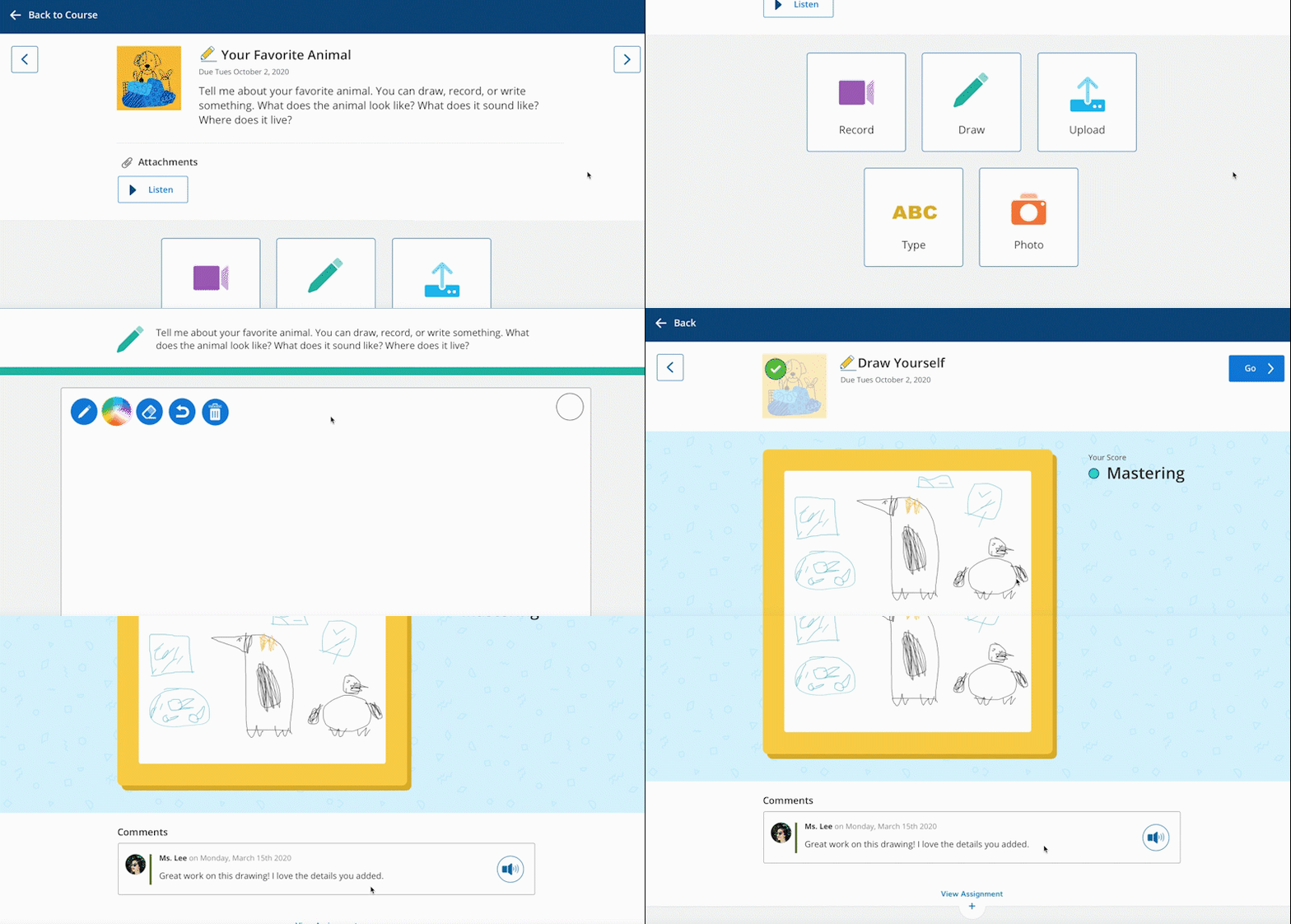
Students Have Multiple Options to Show Mastery
With the Enhanced Elementary Experience, younger students can turn in recordings, drawings, photos, typed work, or an uploaded file to demonstrate their knowledge or mastery. This feature allows for a more personalized experience, allowing educators to meet their students where they are by providing them with various options.
Students Benefit from Reduced Cognitive Load and Easier Access to Materials
Teacher-led instruction can be a new concept for younger learners especially, and keeping up with a complex syllabus, lengthy instructions, and various materials can be confusing (at best) and discouraging (at worst). Fortunately, the new Enhanced Elementary Experience helps ensure that younger students don’t get overwhelmed and are able to access only the activities they need–all in a singular location specifically designed for them.
Teachers Have Flexibility
Teachers can turn on the Enhanced Elementary Experience features at an individual section level. This means that some classes may use it while others don’t. Occasionally, elementary teachers may teach sections of different grade-level students, making this feature a significant benefit for those who teach one section of 1st graders and one of 5th graders, for example.
Parents and Families Maintain a Consistent Experience
The Enhanced Elementary Experience only affects the student interface, which means staff and parents maintain all the functionality they’re used to having. For parents with multiple students in different grade levels—a first grader and an 11th grader, for example—it helps to have a consistent experience when communicating with teachers, checking grades, and keeping up to date on the happenings around school. As “at-home co-teachers,” giving parents one place to go to support all of their students is more important now than ever before.
We know today’s students are digital natives, and it’s unlikely that their use of the internet will decrease. But, by delivering engaging educational experiences in an intuitive format that they’re used to, they’re more likely to spend more of that screen time on schoolwork, which will lead to greater progressions in their learning.
